Summary:
A study of Qwen’s AI agent reveals 4 design lessons: support discoverability, reuse familiar patterns, handle personal data carefully, and protect user autonomy.
GenAI chatbots have made AI-as-personal-assistant feel within reach — and AI agents are the next step toward making that vision real. In consumer contexts, AI agents could theoretically handle daily requests, like ordering groceries or booking flights and hotels. However, our past research suggests today’s agents aren’t ready for everyday use.
Qwen, a genAI chatbot in China, is taking early steps toward integrating AI agents in users’ everyday task flows. In a recent remote usability study, six Chinese participants (ages 18–45, with varying levels of genAI experience) used Qwen’s agent features, most of them for the first time. This article examines what worked, what didn’t, and what these findings suggest for designing AI-agent experiences.
Chinese AI Agents
An AI agent is a system that pursues a goal by taking actions iteratively, evaluating progress, and determining its own next steps.
Chinese AI agents have a structural advantage over their Western counterparts. The country’s dominant tech platforms (Alibaba, Tencent, and Bytedance) have spent years bundling ecommerce, payments, messaging, and everyday services into single, mobile-first ecosystems. When one of those platforms builds an AI agent, it isn’t starting from scratch. It already has years of behavioral data to draw on.
Qwen illustrates this advantage. Built by Alibaba (roughly the equivalent of Amazon, PayPal, and a national delivery network rolled into one) Qwen’s agent has access to a user’s chat history within the app, and also potentially to their broader Alibaba footprint: what they’ve searched for, what they’ve bought, and how often they reorder the same things. Every interaction with the agent feeds back into that picture. Over time, the agent starts anticipating requests, surfacing the product or shop before the user has finished typing or defaulting to their usual airline for a recurring trip.
The business incentive is clear. For a platform that already owns the delivery, payments, and social layer of daily life, a capable AI agent is a powerful driver of both customer acquisition and loyalty. Every task the agent handles keeps the user inside the ecosystem — and the more it handles, the less reason there is to go elsewhere.
Qwen’s AI Agent
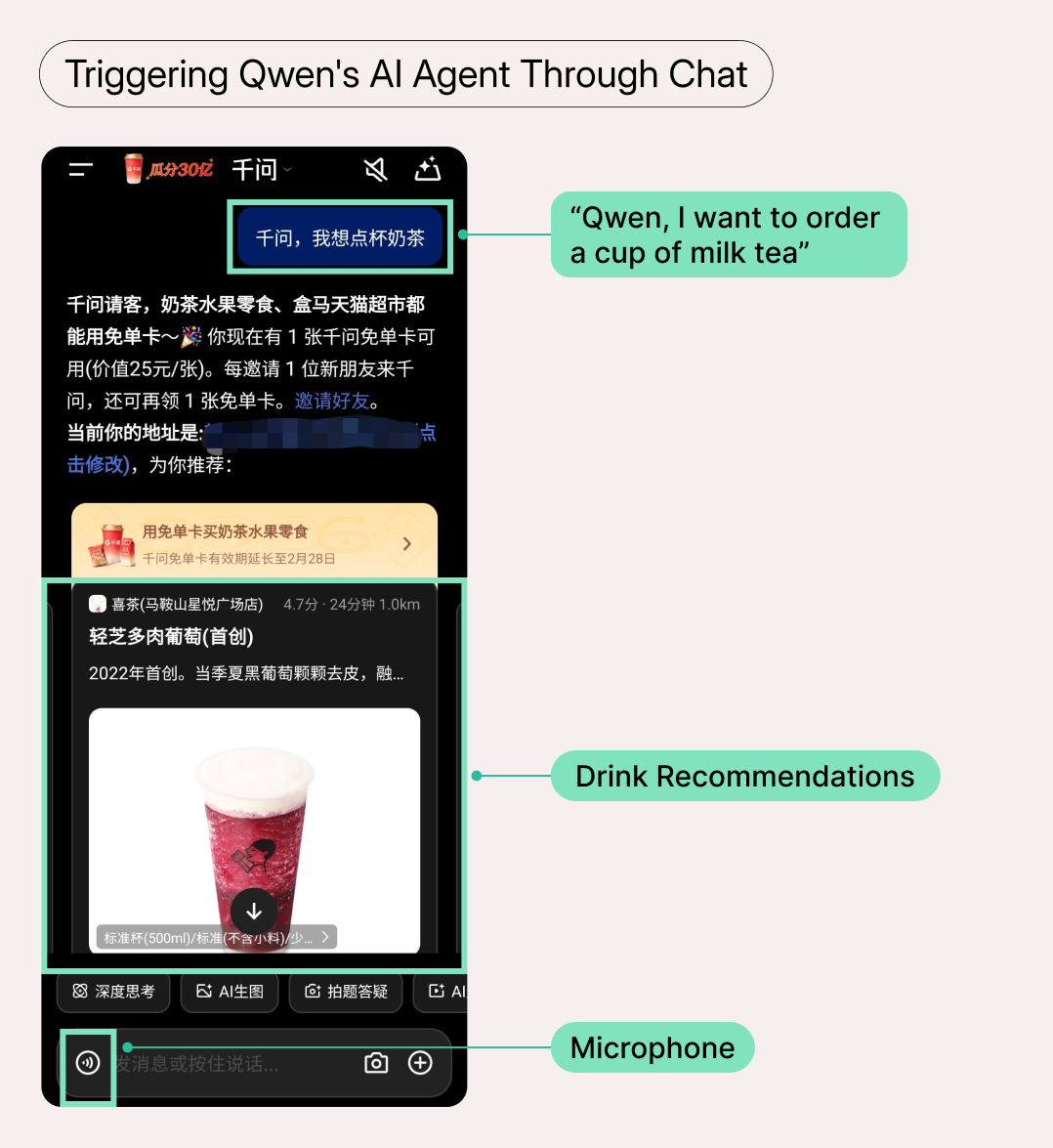
Adoption of AI agents in China is still low, and companies are trying everything to drive uptake. During our study, Qwen promoted its agent with discounts and free milk tea. We used these promotions as the basis for our primary task, letting us test the end-to-end ordering flow under realistic conditions.
Through Qwen’s AI agent, users could:
- Order food delivery and groceries
- Book rides, flights, and train tickets
- Purchase movie tickets
- Reserve hotel rooms
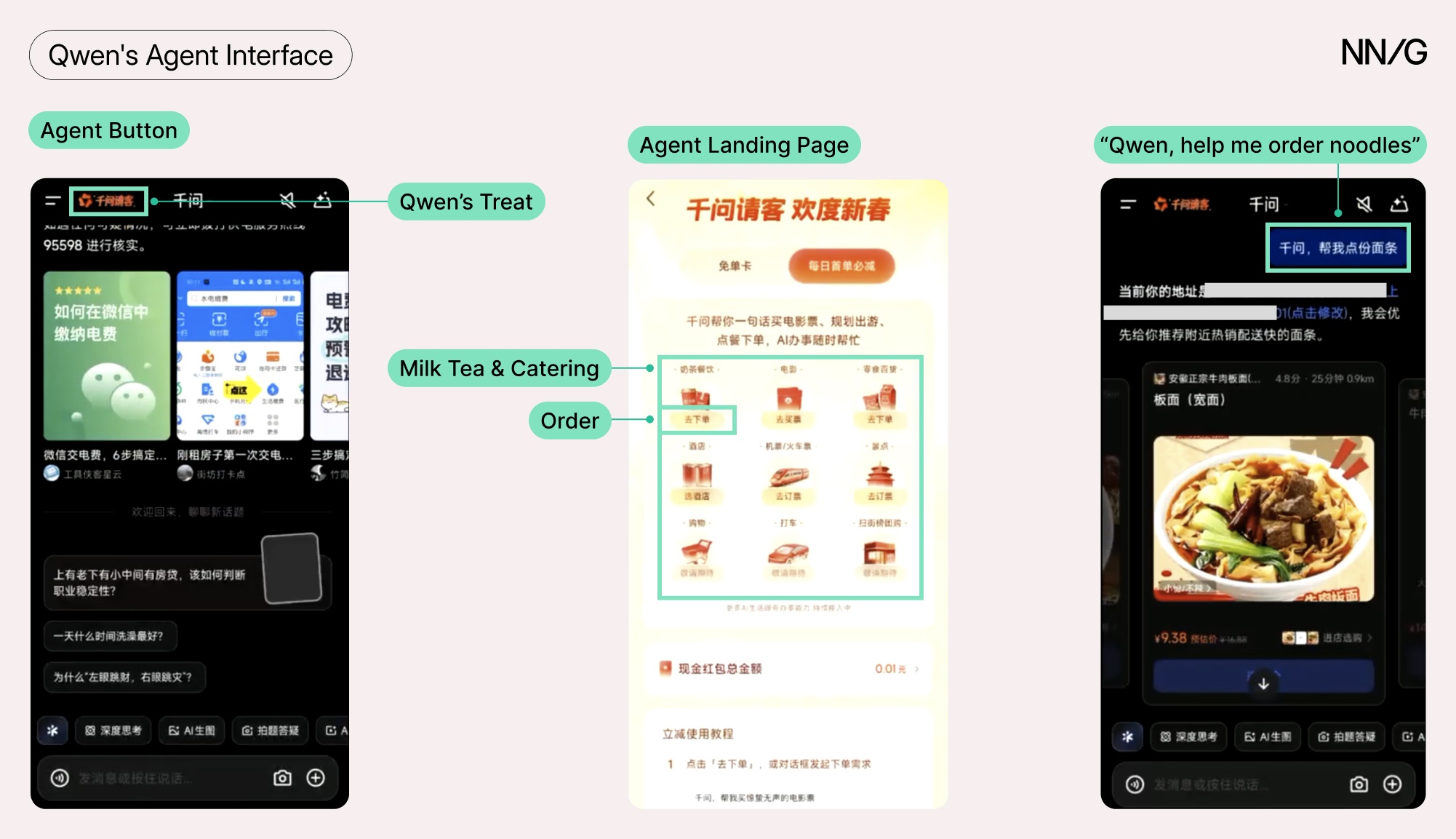
Users could activate Qwen’s agent features in two ways:
- Make a request via chat (for example, “Help me order a cup of milk tea”).
- Tap a prominent Qwen’s Treat button to open a landing page of agent tasks; selecting a category sends a prefilled prompt to the chat.
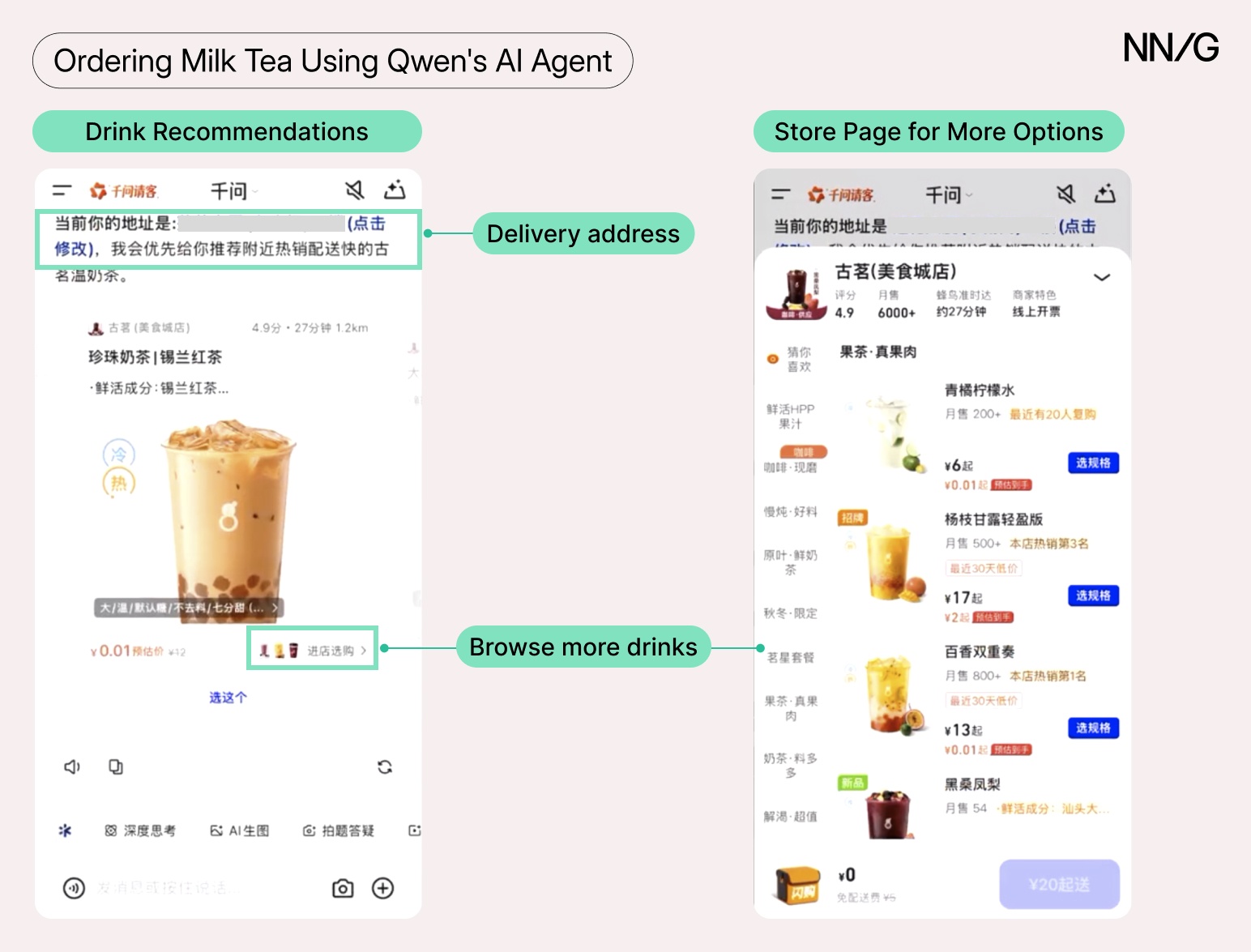
After the prompt was sent, the experience and interaction patterns varied by task. For example, when ordering milk tea, users saw recommended drinks and could browse more drinks from the same shop through a popup interface that mirrored traditional delivery apps.
For flight booking, the agent presented options directly in the conversation, then transitioned users to a structured booking page where they could select their seat and enter personal details.
4 Lessons from Qwen’s AI Agent
Lesson 1: Support Discoverability Through Redundancy
Ordering through an AI agent is still unfamiliar to most people in China. When we asked our participants to order milk tea, five of six defaulted to traditional delivery apps; only one (an expert user) used Qwen on their own.
When asked to try Qwen, participants first looked for a food-delivery section rather than typing a request. They expected the familiar GUI flow: browse stores, select items, place order. Even frequent genAI users had a mental model of chatbots as tools for answering questions — not completing transactions.
“I would never imagine using this [a genAI chatbot] to order deliveries. It’s not my habit.”
Qwen addressed this mental-model issue with redundant entry points: experienced users could type requests, while others could use a visually prominent button that led to a menu of categorized agent tasks.
Unfortunately, the novice-oriented entry point sometimes backfired. For example, one participant who wanted to order milk tea tapped the button, navigated to the Milk Tea & Catering category, and clicked the order button.
What happened next was not what the user expected: the prompt “Qwen, help me order a bowl of noodles“ was sent to the AI. However, the participant wanted to order milk tea, not noodles. The mismatch created confusion and extra work.
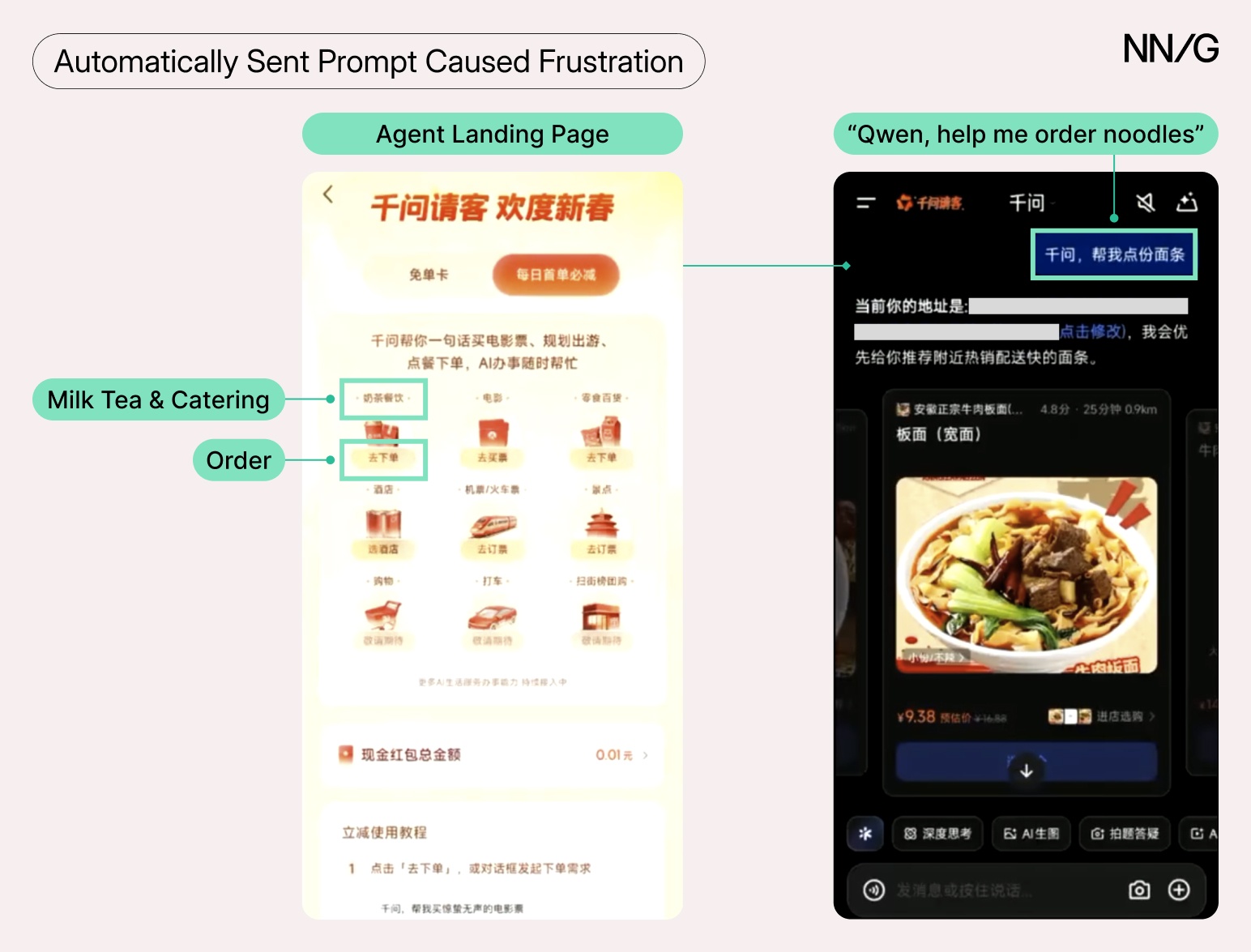
Prefilling prompts works well when the scope is narrow. Another participant was happy when the agent automatically composed a request to buy a movie ticket after she tapped the Order button in the Movie Tickets section. But for broader categories like food orders, automatically filling a specific item is more likely to miss the mark than to help.
A better approach would be to first ask the user a clarifying question (e.g., What would you like to order?), and provide a list of options (like milk tea, noodles, or fast food).
Lesson 2: Use Familiar Patterns to Reduce Learning Cost
Users shouldn’t need to learn new interaction patterns to complete familiar tasks. When agents reuse established UI conventions, users can focus on decisions rather than mechanics.
One participant felt disoriented when initiating an order through chat, but quickly regained confidence once they got to a page where the interface resembled a delivery app:
“Okay, now I know where I am. This looks familiar.”
Qwen intentionally mirrored common patterns — category navigation, item lists, and product pages — to reduce friction.
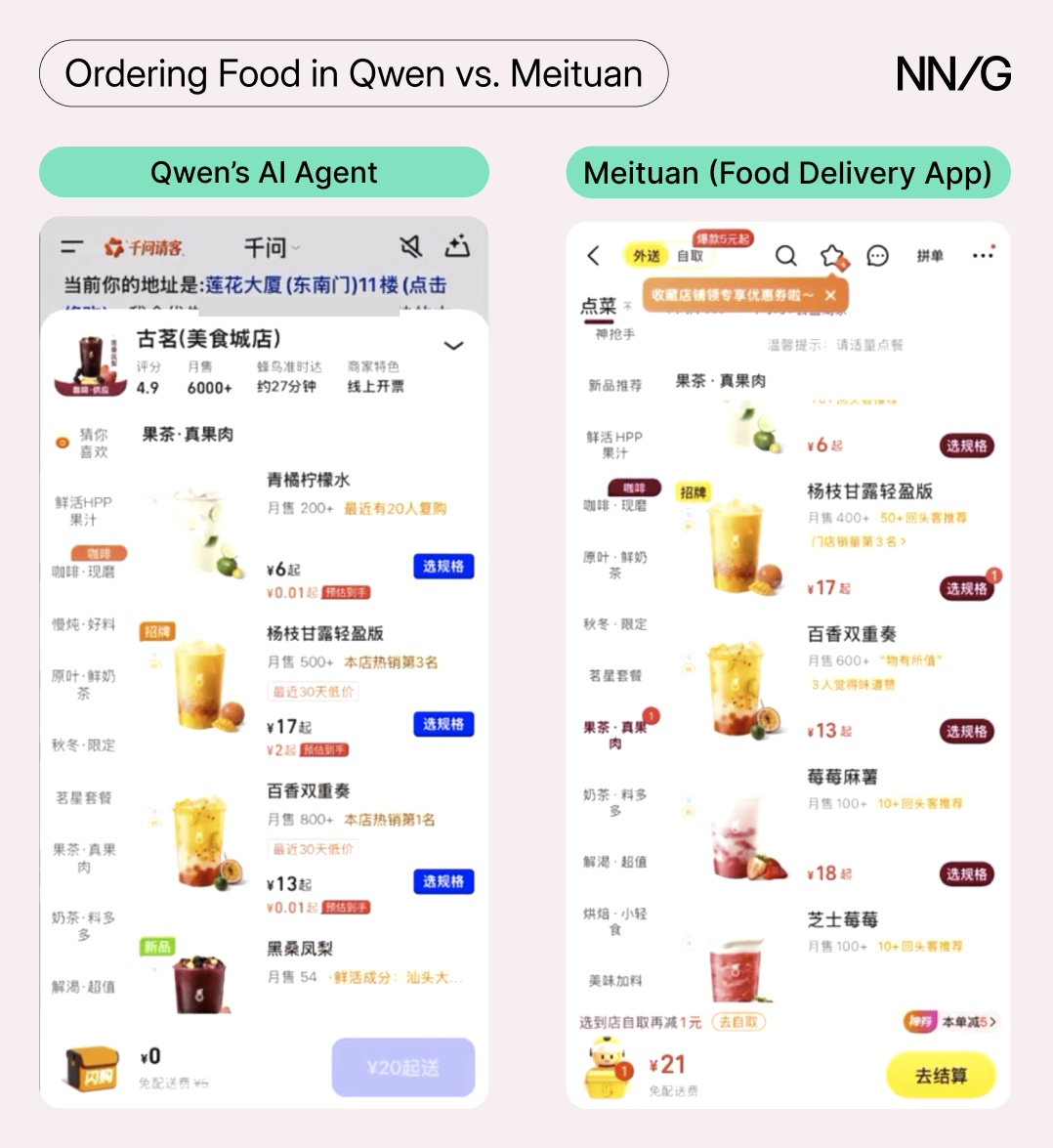
However, familiar patterns must still fit the context. Qwen displayed recommended shops in a carousel, showing one option at a time. The carousel provided no sense of how many options existed. One participant assumed Qwen had only a few shop choices and switched to another app.
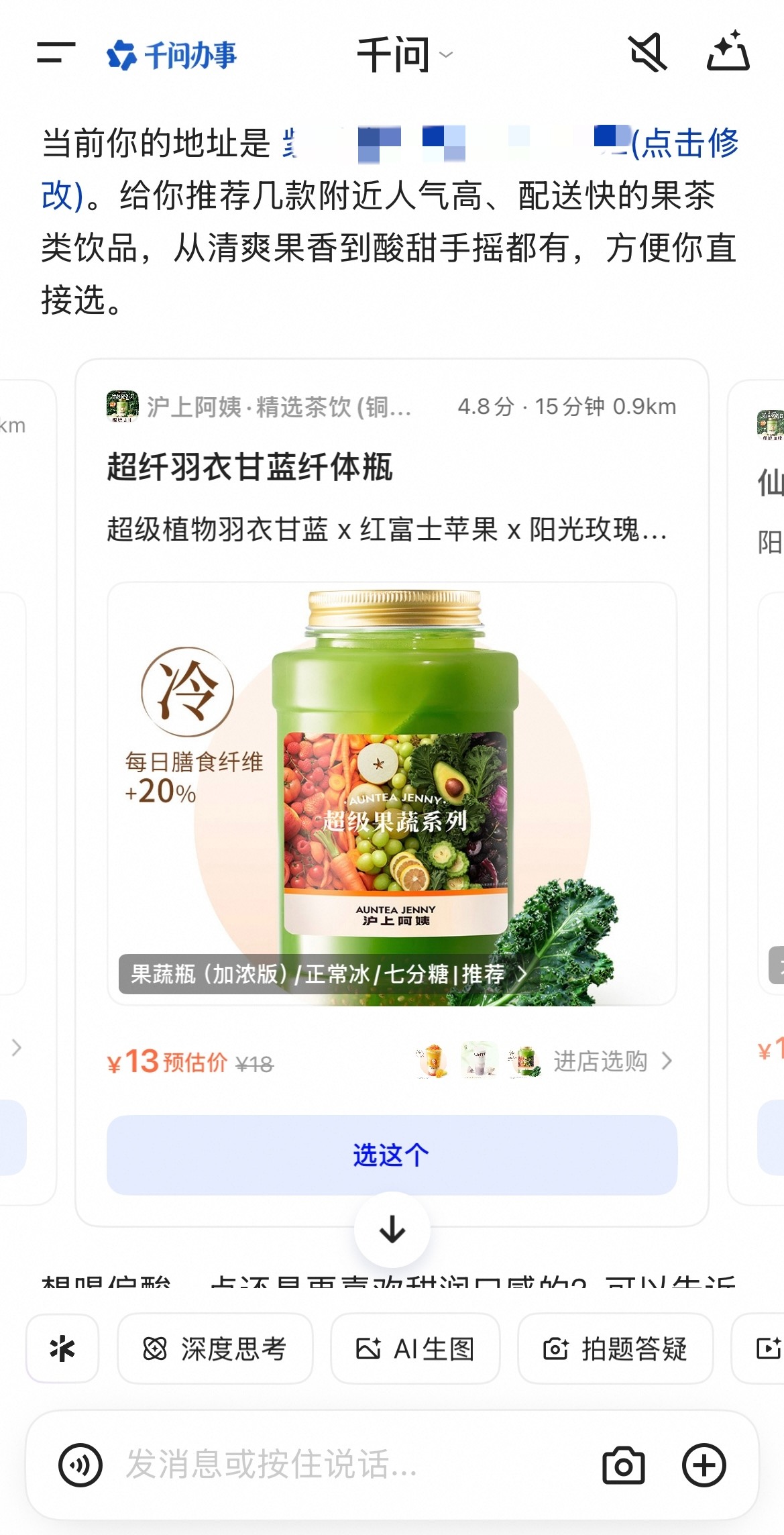
Carousels work for small sets. A grid layout, result count (e.g., 12 shops nearby), or a list view would better communicate what’s available.
Lesson 3: Handle Personal Data Carefully
Not all users trust AI. When it comes to AI agents, users don’t always understand how these systems work, where their data goes, or why companies are pushing various features so aggressively.
Almost every participant in our study had heard of Qwen’s agent before the session — it was hard to miss, given how widespread Qwen’s advertising was. However, two participants were reluctant to try it. One explained:
“I heard Qwen would give out milk tea free of charge. But I don’t think these companies would give you free items without any costs.”
Several participants raised privacy concerns as they navigated the order process, largely because of how Qwen surfaced their personal information.
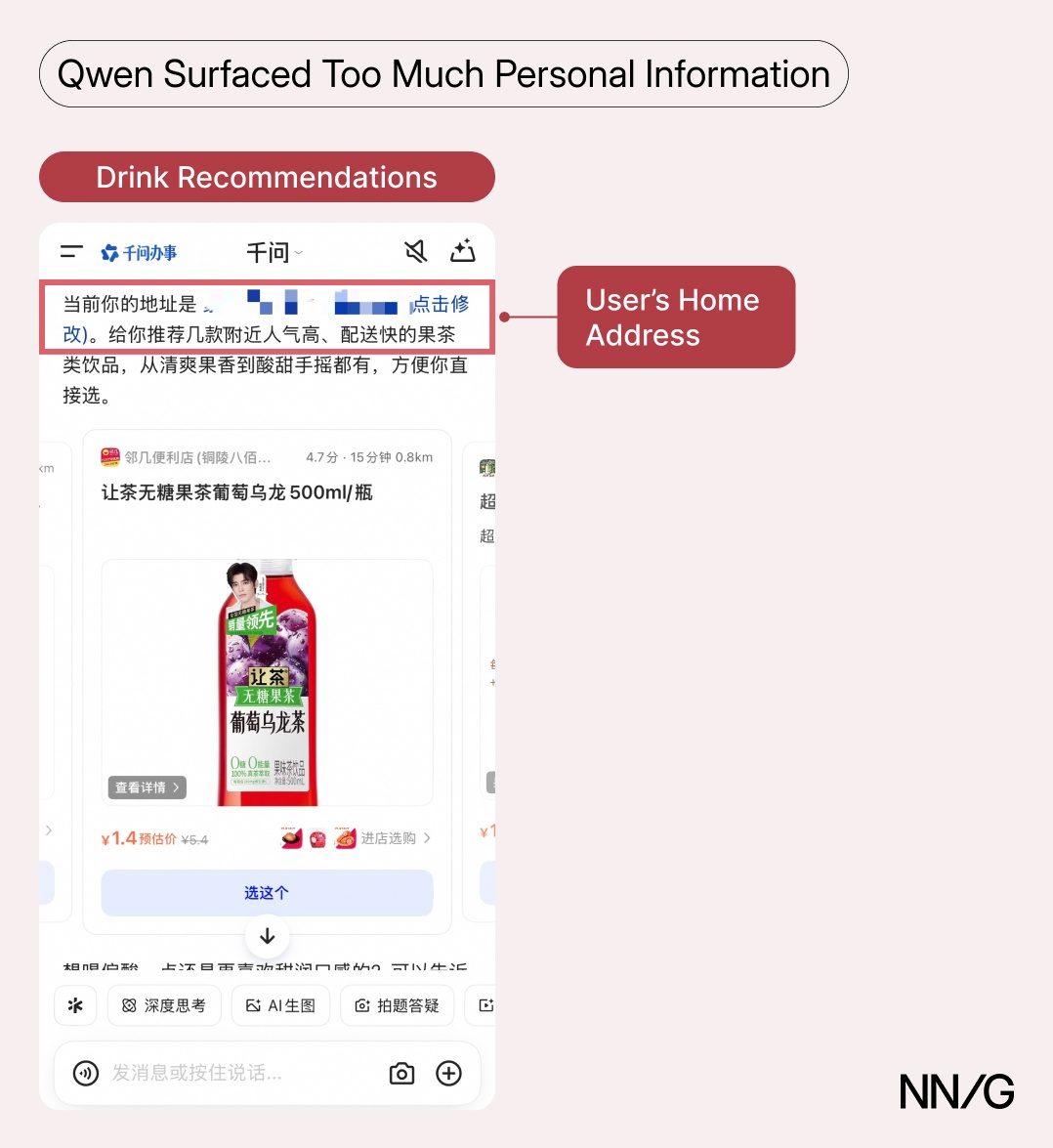
When users requested milk tea, Qwen prompted them to authorize access to the ecommerce platform, Taobao. Most didn’t realize that granting this permission would enable Qwen to see their delivery address (as saved in Taobao) — Qwen buried the explanation in small gray text that users scrolled past. After authorization, their full address (street, building number, sometimes province and city) appeared immediately, before they had selected any items. Without context, users assumed that Qwen had access to a broad variety of data, such as their full shopping history.
“All of a sudden, this address showed up (…) I feel like my address was leaked.”
Even if technically inaccurate, this perception is hard to recover from. Two participants said they would switch back to traditional apps. When users form a misconception about how a technology handles their data, most won’t stop to investigate. They’ll just leave.
Three design changes could address this issue directly.
- Authorization screens should clearly state what data will be accessed and require active acknowledgment — rather than be presented as a notice that users can scroll past.
- Before displaying any address, the agent should explain how it’s used: We’re using your address to find nearby shops.
- Agents should access and surface only the minimum data needed for the current step. (For example, only the ZIP code should appear while browsing; users can confirm their full address when they’re ready to place an order.)
Lesson 4: Prioritize Transparency to Protect Autonomy
Users want efficiency, but not at the cost of control. Qwen generally supported autonomy: users could adjust details mid flow, select drinks beyond the recommendations, review orders, and complete payments through AliPay (one of the most popular online-payment methods) without leaving the Qwen app. Users still retained control; they needed to authenticate with AliPay before allowing payments.
However, autonomy depends on transparency, and two incidents revealed where Qwen fell short.
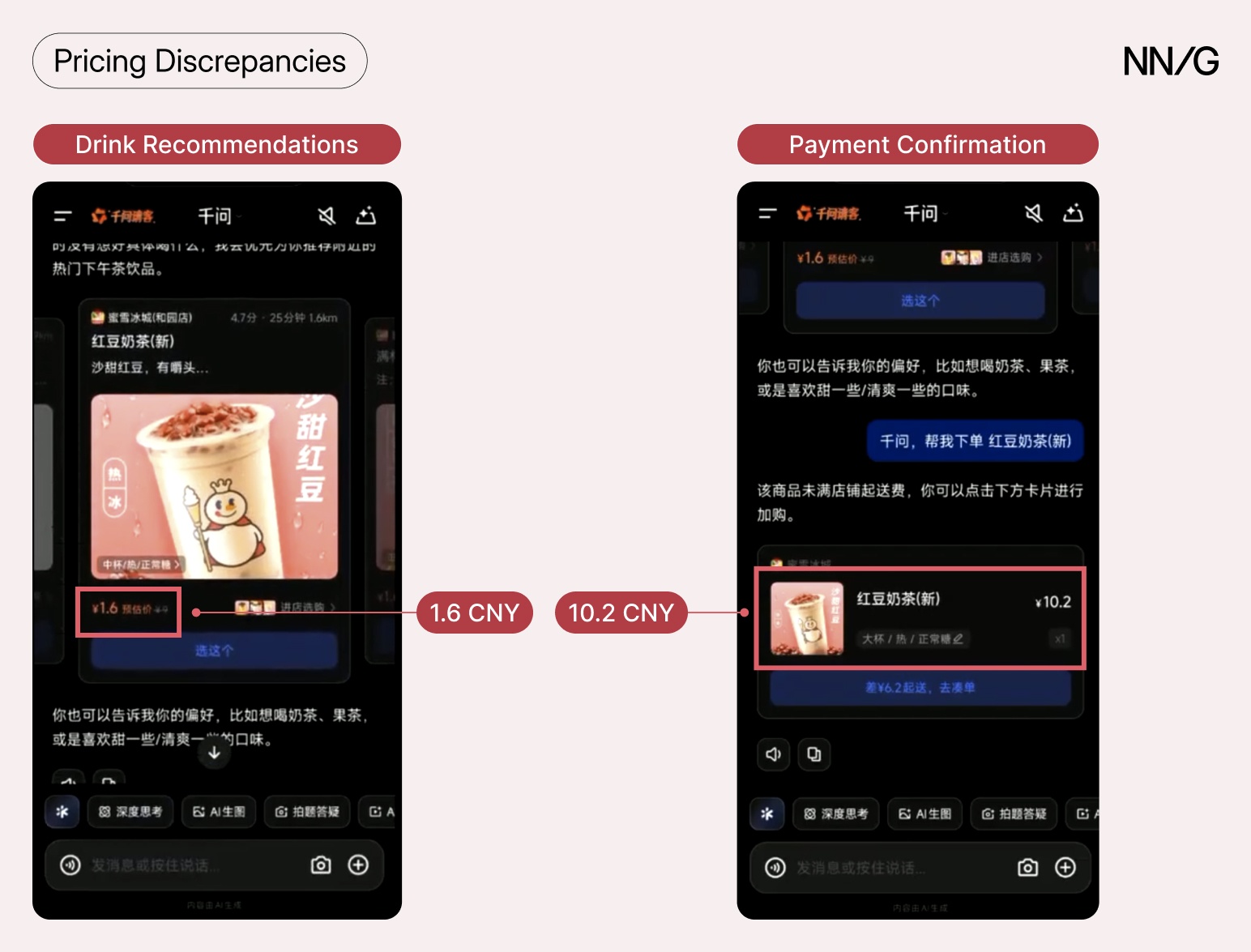
One participant chose a milk tea drink priced at ¥1.6 CNY (approximately $0.23 USD) and proceeded to check out — only to find the final price was ¥10.2 CNY (approximately $1.40 USD), with no explanation of the difference. The final price included delivery and packaging fees. Additionally, the participant didn’t meet the delivery price requirement — he would have needed to spend at least 16 CNY (2.35 USD) to get it delivered. However, none of this information was surfaced to him. He felt misled by Qwen and told us he’d compare prices on a traditional delivery app before ordering through Qwen again.
A similar problem occurred when a participant tried to book an international flight. The agent narrowed the options to three airlines — which was useful — but didn’t display baggage allowance information for any of them. Because the participant was unable to see this information, which was important to her comparison, she abandoned Qwen and started a new booking in a dedicated travel app. The agent’s efficiency in narrowing options meant nothing once decision-critical information was missing.
Agents that save users time while keeping them informed and in control will earn long-term trust.
Conclusion
Qwen’s AI agent is new, but the usability issues participants encountered were not. The problems were basic, and they caused confusion, uncertainty, and alarm.
Good usability is always important, but it’s crucial when introducing a feature that users aren’t familiar with. For AI agents to gain traction, users must be able to understand, guide, and trust them – capability alone is not enough.